Complete Control with BTC Tools for ASIC Miner Setup, Monitoring and Maintenance
BTC Tools is built for operators who need to manage ASIC miners inside a local network. The software helps with daily mining tasks: finding devices, checking status, sorting miners, changing pool settings, managing worker names, restarting selected units and keeping an organized view of the farm.
BTC Tools Download is suitable for home miners with a small number of devices and for professional mining farms with many network segments. The tool can scan ASIC miners, show hashrate, temperature, fan speed and pool information, and help technicians quickly find devices that require attention.

Tools for Scanning, Sorting, Monitoring and Batch Management
BTC Tools includes the main functions operators need for daily ASIC miner control: network scanning, device sorting, status monitoring, batch configuration, batch restart, software updates, power management and frequency adjustment. BTC Tools Download gives miners access to a practical utility for managing ASIC devices faster and keeping farm maintenance organized.
BTC Tools helps find ASIC miner IP addresses across local network segments, review detected devices in one table and reduce manual router checks.
Scan multiple LAN ranges with BTC Tools, group network segments and keep mining rooms, shelves or subnets easier to manage.
Use BTC Tools to manage Antminer devices with pool settings, worker names, status checks, selected batch actions and restart workflows.
BTC Tools Download gives operators access to miner monitoring software for hashrate, temperature, fan speed, pool status and abnormal values in one dashboard.
Apply pool, worker and configuration changes through BTC Tools to selected miners without opening every device interface manually.
Restart selected ASIC miners in bulk with BTC Tools when maintenance, pool changes or recovery operations are required.
BTC Tools supports controlled firmware update workflows for groups of compatible ASIC miners and helps keep maintenance more organized.
Use BTC Tools for power profiles and operational settings that support maintenance, stability and farm-level ASIC miner control.
Adjust frequency settings in BTC Tools for supported miner models and keep configuration consistent across the mining fleet.
BTC Tools can sort miners by hashrate, temperature, fan speed, worker name, pool, IP address or status to detect problems faster.
BTC Tools Download helps operators discover new ASIC devices after installation and add them to the operational view more quickly.
BTC Tools helps manage home setups and larger mining farms from one practical interface focused on daily ASIC operations.
BTC Tools gives technicians a practical workflow for daily ASIC management and fast access to miner data without opening every miner interface manually. BTC Tools Download is useful for operators who need to scan devices, check status, sort miners and apply supported batch actions from one interface.
Define the LAN ranges where ASIC miners are connected. In BTC Tools, segments can represent rooms, shelves, containers, switches or different farm areas.
Run the ASIC Network Scanner in BTC Tools to find supported miners and collect status data such as hashrate, temperature, fan speed and pool configuration.
Use BTC Tools to sort miners by temperature, computational power, name, pool, IP address or status and identify underperforming or abnormal devices faster.
BTC Tools Download gives operators access to batch configuration, selected restart, software updates, power profiles and frequency adjustment where supported by the device model.
BTC Tools includes an ASIC IP Scanner for operators who need to find miner IP addresses inside a local network faster. Most maintenance tasks start with a simple question: where is the miner on the network? Instead of checking router tables manually, guessing IP ranges or opening every device one by one, an operator can scan the local network and review detected ASIC miners in a structured list.
The scanner is useful when new Antminer, WhatsMiner, AvalonMiner or other ASIC devices are connected to a LAN. In many mining environments, devices are installed in batches, DHCP addresses can change, labels may be missing and network segments may be separated by room, shelf or electrical line. BTC Tools helps technicians find devices, compare basic information and start configuration without wasting time.
BTC Tools Download also supports better troubleshooting for daily ASIC maintenance. When a miner is not visible, appears in the wrong segment or reports abnormal values, the operator can identify the issue earlier. Mining downtime directly affects revenue, so a practical ASIC IP Scanner makes routine work faster, cleaner and more predictable.
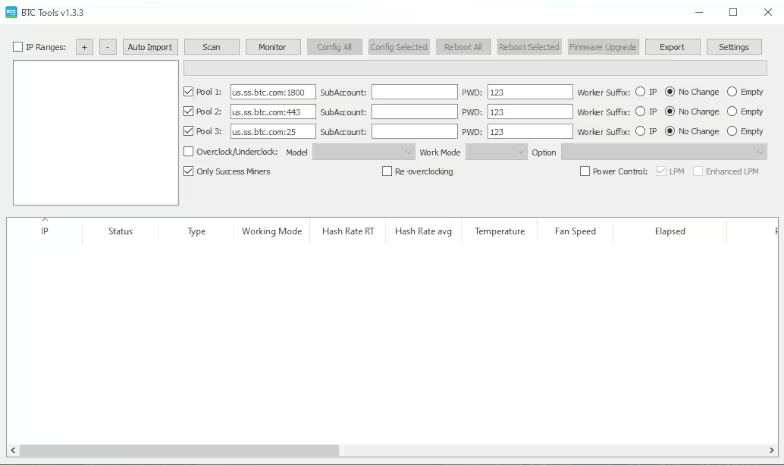
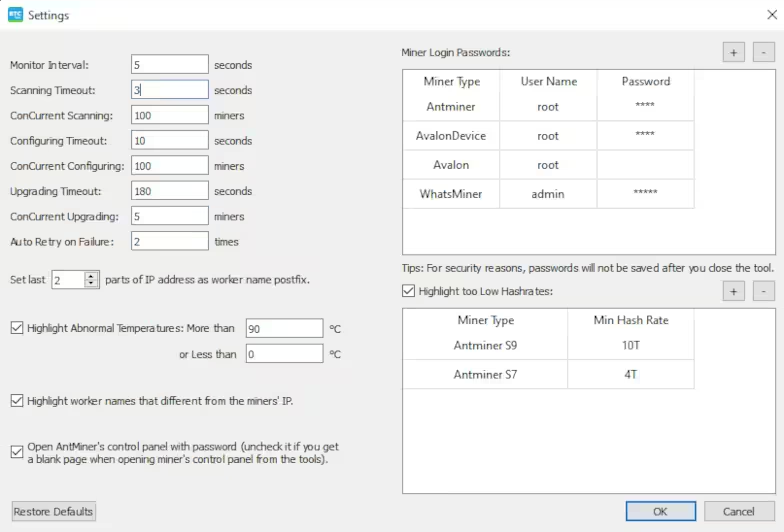
BTC Tools works as an ASIC Network Scanner for mining farms that use more than one local IP range. Large farms often separate miners by rooms, shelves, containers, switches or subnets, and each segment can contain dozens or hundreds of devices. Network scanning helps operators organize this structure in a usable view.
The scanner shows reachable miners, status data and key operating parameters. This helps the technician understand what is online, what needs attention and whether the network layout matches the physical layout of the farm. For larger facilities, BTC Tools is more convenient than checking each device manually through a browser.
The practical value of an ASIC Network Scanner is speed and visibility. Operators can use it during installation, after router changes, after maintenance, after power events and when troubleshooting connectivity problems. A clean scan gives a better starting point for configuration, monitoring and diagnostics.
BTC Tools is often used as an Antminer Tool because many operators need one interface for Bitmain Antminer monitoring and batch management. Antminer devices are widely used in Bitcoin mining, and even a small farm can become difficult to manage if every miner must be opened manually.
A good Antminer Tool helps operators review hashrate, temperature, fan speed, pool information, worker names and operational status. It also makes repetitive tasks faster, including pool changes, worker naming, selected miner restarts and checks for abnormal device behavior.
For technicians, the main advantage is consistency. If a farm contains many Antminer devices, standardized settings reduce confusion. BTC Tools helps apply the same pool addresses, naming patterns and maintenance actions to selected miners, which lowers manual errors and makes farm operation more predictable.
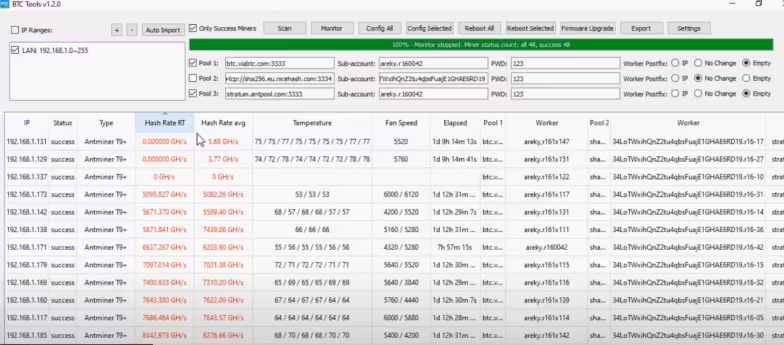
BTC Tools Antminer Tool interface preview
BTC Tools Download gives operators access to miner monitoring software for reviewing ASIC equipment health from one dashboard. Important values include hashrate, temperature, fan speed, pool status, uptime and device response. This information helps technicians find problems faster during daily farm checks.
Monitoring matters because a miner can be powered on but still work poorly. Low hashrate, high temperature, fan issues or wrong pool settings can reduce profitability. With BTC Tools, the operator can check many devices from one interface, sort the list, identify outliers and decide which units need attention.
Regular monitoring also supports maintenance routines. A technician can scan the farm, sort devices by temperature, check pool configuration and find miners that are underperforming. This makes the software useful not only during setup, but also during normal ASIC operation.
BTC Tools is useful for Batch Miner Configuration when a farm has many ASIC miners and manual setup takes too much time. Changing settings one by one increases the risk of mistakes, while batch configuration helps apply selected changes to groups of devices.
Typical batch tasks include updating mining pool addresses, changing worker names, editing passwords, applying selected settings and keeping miner configuration aligned with the farm plan. This is helpful after changing pools, adding new machines, moving miners between groups or reorganizing worker naming rules.
The advantage is operational discipline. Instead of depending on separate browser sessions for every miner, the operator works from one interface and applies a controlled action to selected devices. BTC Tools Download helps save time and makes it easier to track what was changed.
BTC Tools supports Mining Farm Management beyond simple scanning or monitoring. Daily operation includes finding miners, configuring them, checking status, sorting abnormal devices, restarting selected units, managing pool data, planning updates and responding to failures.
For small setups, mining management software keeps work simple. For larger farms, it becomes a productivity tool. Technicians can handle more devices with less manual work, while managers get a clearer operational picture. The goal is not to automate every mining task, but to reduce repetitive actions and improve control.
A strong mining farm management workflow also depends on physical labeling, network planning and clear procedures. BTC Tools supports that workflow by giving operators fast access to miner information and selected batch actions. When combined with disciplined maintenance, the result is a more stable and manageable mining environment.
BTC Tools can support Batch Firmware Updates and software update workflows for compatible miner models. In mining operations, firmware management must be handled carefully because compatibility, stability and configuration retention matter.
Update workflows are useful when a selected group of miners needs maintenance. Operators can prepare the correct file, select the intended devices and run the update process in a more organized way. This is much better than opening many individual web interfaces and repeating the same steps manually.
Firmware updates should always be planned. Operators should verify compatibility, back up important settings where possible and test updates on a small group before applying changes broadly. BTC Tools Download helps make the process more efficient, but careful maintenance rules still matter.
BTC Tools helps with Hashrate Monitoring and Temperature Monitoring, two critical tasks in ASIC mining operations. A miner that produces less hashrate than expected, runs too hot or shows unstable fan behavior can reduce profitability and create maintenance risks.
Sorting miners by hashrate or temperature is a practical way to find outliers. A device with abnormal temperature may need airflow checks, cleaning, fan replacement or environment adjustments. A device with low hashrate may require pool review, power review, firmware check or hardware diagnostics.
Good monitoring improves reaction time. Instead of waiting for a pool dashboard or revenue report to show that something is wrong, technicians can inspect the farm directly. This is why BTC Tools is valuable for both small miners and professional mining farms.
| Component | Recommended requirement |
|---|---|
| Operating system | Windows 10 / Windows 11 for the main downloadable version |
| Network | Computer connected to the same local network as ASIC miners |
| RAM | 4 GB or more for comfortable operation |
| CPU | Dual-core processor or better |
| Display | 1366×768 minimum, Full HD recommended for larger farms |
| Permissions | Local network access and permission to communicate with miners |
“BTC Tools made it easier to find miners across several local network segments and apply pool settings without opening every device manually.”
Farm Operator“The IP scanner and sorting functions are useful during installation. We can detect new devices, check temperature and find units that need attention.”
ASIC Technician“For farms that still rely on manual browser configuration, a tool like this can reduce repetitive work and improve operational discipline.”
Mining Consultant“Batch restart and batch configuration features are helpful during planned maintenance windows.”
Maintenance LeadFAQ
Frequently Asked Questions
What is BTC Tools?
BTC Tools is software for discovering, monitoring and managing ASIC miners on a local network. Operators use it to find miner IP addresses, check hashrate and temperature, sort devices, change selected settings and manage daily ASIC maintenance from one interface.
What is BTC Tools Download?
BTC Tools Download gives users access to the Windows version of BTC Tools for ASIC miner management. After installation, the software can be used for scanning, monitoring, sorting and selected batch actions.
What is an ASIC IP Scanner?
An ASIC IP Scanner finds ASIC miner IP addresses inside a local network range. BTC Tools shows detected devices in a structured table, so operators do not need to check router tables or open every miner manually.
Does BTC Tools work as an Antminer Tool?
Yes. BTC Tools is commonly used as an Antminer Tool for scanning, monitoring and selected batch management tasks.
Can BTC Tools scan different network segments?
Yes. BTC Tools can scan miners across different local network segments. This is useful for farms where ASIC devices are divided by rooms, shelves, containers, switches or subnets. Separate scanning helps technicians compare the network structure with the physical layout of the farm.
What information can BTC Tools show?
BTC Tools can show hashrate, temperature, fan speed, pool configuration, worker name, IP address, miner name and device status. The exact data depends on the miner model, firmware and network access.
Can I sort miners in BTC Tools?
Yes. BTC Tools allows operators to sort miners by hashrate, temperature, fan speed, worker name, pool, IP address, status and other available parameters.
Sorting is useful during daily checks. For example, a technician can quickly find overheated devices, low-performing miners, units with wrong pool settings or machines that stopped responding normally.
Does BTC Tools support miner monitoring?
Yes. BTC Tools supports miner monitoring by collecting important ASIC status data from the local network and updating it in one interface.
Can I configure miners in batches?
Yes. Batch Miner Configuration is one of the main BTC Tools functions. Operators can apply selected settings to groups of supported miners instead of opening every device interface manually.
This is useful when changing pool addresses, updating worker names, editing passwords or aligning miner settings after adding new devices. Batch actions reduce repetitive work and lower the risk of manual mistakes.
Can BTC Tools restart miners in batches?
Yes. BTC Tools supports batch restart workflows for selected devices where this function is available. Operators often use it after configuration changes, maintenance actions or recovery operations.
Can BTC Tools update miner software?
BTC Tools includes batch software and firmware update workflows for supported miner models. Operators should always check compatibility, prepare the correct update file and test the process on a small group before applying changes across a larger farm.
Does BTC Tools support power management?
Yes. BTC Tools includes batch power management features for supported devices.
Can BTC Tools adjust miner frequency?
BTC Tools includes frequency adjustment workflows for several supported miner models. Frequency changes should be handled carefully because they can affect stability, temperature, power consumption and hardware behavior.
Is BTC Tools suitable for home mining?
Yes. BTC Tools can be useful for home mining setups. Even with a small number of ASIC miners, it saves time on scanning, checking status, monitoring temperature and managing basic settings.
Is BTC Tools suitable for large mining farms?
Yes. BTC Tools is especially useful for larger mining farms with many ASIC miners and several network segments. Scanning, sorting, monitoring and batch configuration help technicians reduce manual work and keep the farm easier to control.
Does BTC Tools require internet access?
BTC Tools focuses on local network scanning and ASIC miner management. The computer running the software should have access to the same LAN as the miners.
Internet access may still be needed for miner pool connections, downloading software files, firmware updates or external resources. For local scanning itself, the key requirement is network access to the ASIC devices.
Can BTC Tools change pool settings?
Yes. BTC Tools can help change pool settings for selected supported miners. This includes pool addresses, worker names and related configuration fields.
Can BTC Tools help troubleshoot overheating?
Yes. BTC Tools can show temperature and fan data for supported ASIC miners. This helps operators identify devices that may need cleaning, airflow checks, fan replacement, placement changes or deeper diagnostics.
Can BTC Tools replace professional monitoring platforms?
BTC Tools is practical for local scanning, miner monitoring and batch management. For advanced reporting, alert systems, long-term analytics, revenue tracking or enterprise-level automation, operators may still need additional monitoring platforms.
Which operating system is BTC Tools for?
This landing page presents BTC Tools as Windows-focused software. The BTC Tools Download section should clearly show available versions, system requirements and architecture options such as x64 or x86.
Why use BTC Tools?
Operators use BTC Tools to reduce manual work and get faster access to important ASIC miner data.
The software helps scan miners, monitor status, sort devices, manage selected settings and keep daily mining farm maintenance more efficient. Instead of switching between many miner web interfaces, technicians can work from one practical dashboard.
Is BTC Tools free to download?
If BTC Tools Download is offered as a free utility on the website, the page should state this clearly. It is also useful to show the software version, file size, update date and checksum so users can verify the downloaded file.
How do I start using BTC Tools?
Download the correct Windows version, open BTC Tools on a computer connected to the same local network as the miners, add the required IP range and run the scan. After that, review detected ASIC devices in the table and use available monitoring or batch management functions.
What should I do if BTC Tools does not find a miner?
Check that the computer and ASIC miner are connected to the same local network. Confirm the IP range, review firewall settings, make sure the miner is powered on and try opening the miner through its web interface.
If the device is still not visible, check the router, switch, cable, DHCP settings and network segmentation. In larger farms, the miner may be connected to another subnet or physically placed in a different network group than expected.
Can BTC Tools manage different ASIC brands?
BTC Tools can work with supported ASIC miner models, including devices commonly used in Bitcoin mining. Available functions may vary between Antminer, WhatsMiner, AvalonMiner and other ASIC models because each device and firmware can expose different management options.
Is BTC Tools safe to use?
BTC Tools should be downloaded only from a trusted source. A strong BTC Tools Download page should include the software version, file size, release date, checksum and basic verification instructions.
Operators should also use batch actions carefully. It is better to test configuration changes, firmware updates or power settings on a small group of miners before applying them to a large number of devices.